 NotchMuse
Top, Dock or menu bar?
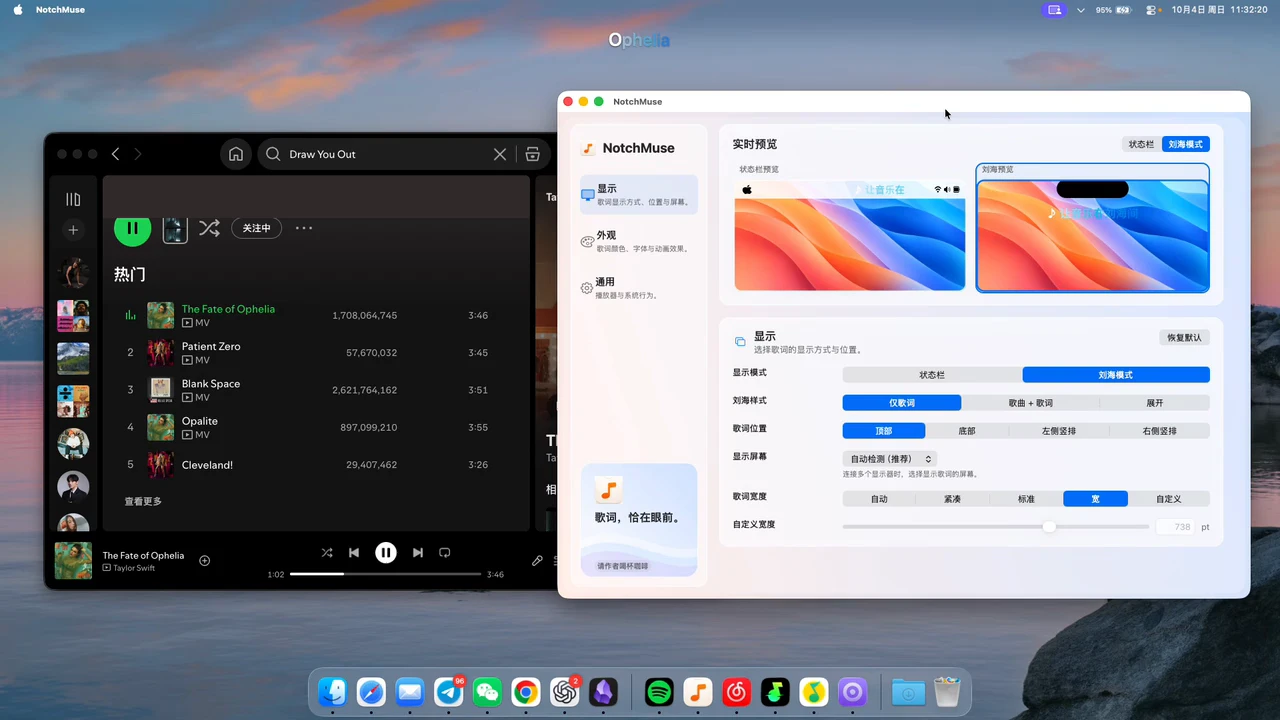
The recording preserves the full desktop so you can judge scale and placement. It is existing product footage, not a simulated notch or a recording of every Mac model.
Set up Notch Mode
- Play music in Spotify, Apple Music, NetEase Cloud Music, QQ Music or Soda Music on your Mac.
- Open NotchMuse Settings and check the selected player.
- Choose Notch Mode, then use the position controls to place lyrics near the top or above the Dock.
- Adjust the width, font size, colors and background to keep the line readable against your desktop.
Start with a familiar song so you can check that both the track and lyric timing follow playback. Coverage depends on the available third-party lyric match.
Check your Mac before downloading
The current public NotchMuse release requires macOS 14 or later and an Apple silicon Mac. Intel Macs are not supported. Check Apple menu → About This Mac if you are unsure which chip you have.
The name Notch Mode describes an overlay position; the menu bar and Dock positions give you other choices. Choose the position that works on your actual display rather than expecting a particular MacBook-shaped cutout in the demonstration.
A focused lyric companion
NotchMuse keeps lyrics near your work and offers placement and appearance controls. It is not a general-purpose Dynamic Island suite with timers, file shelves or a notification center.
If you are choosing a notch app specifically for lyrics, check player support, readability, positioning and song matching first. For Spotify and Apple Music connection details, use the dedicated guides below.
Questions before you try it
Can lyrics move above the Dock?
Yes. The existing Notch Mode demonstration shows the overlay at the top and above the Dock. Use the position controls in Settings.
Is this a full Dynamic Island replacement?
No. This page describes a lyric overlay and its appearance and position controls.
Does it work on Intel MacBooks?
No. The current release requires an Apple silicon Mac and macOS 14 or later.
Installation and privacy
The public release requires macOS 14+ and Apple silicon; Intel is not supported. Direct downloads are ad-hoc signed, without Developer ID signing or Apple notarization, so first launch may show a security prompt. Read the installation steps.
The app needs no account, collects no telemetry and does not read or upload audio. Track metadata may be sent to third-party lyric providers. Website analytics is separate and requires consent; a download click does not confirm installation. Privacy and website analytics
Sources and further reading
Documentation reviewed October 17, 2026. Player interfaces and third-party services can change.